
Control your ChatGPT context
NavGPT adds a lightweight sidebar that shows every prompt in your chat- so you can jump, copy, and refine faster.
Pro features unlocked for 14 days
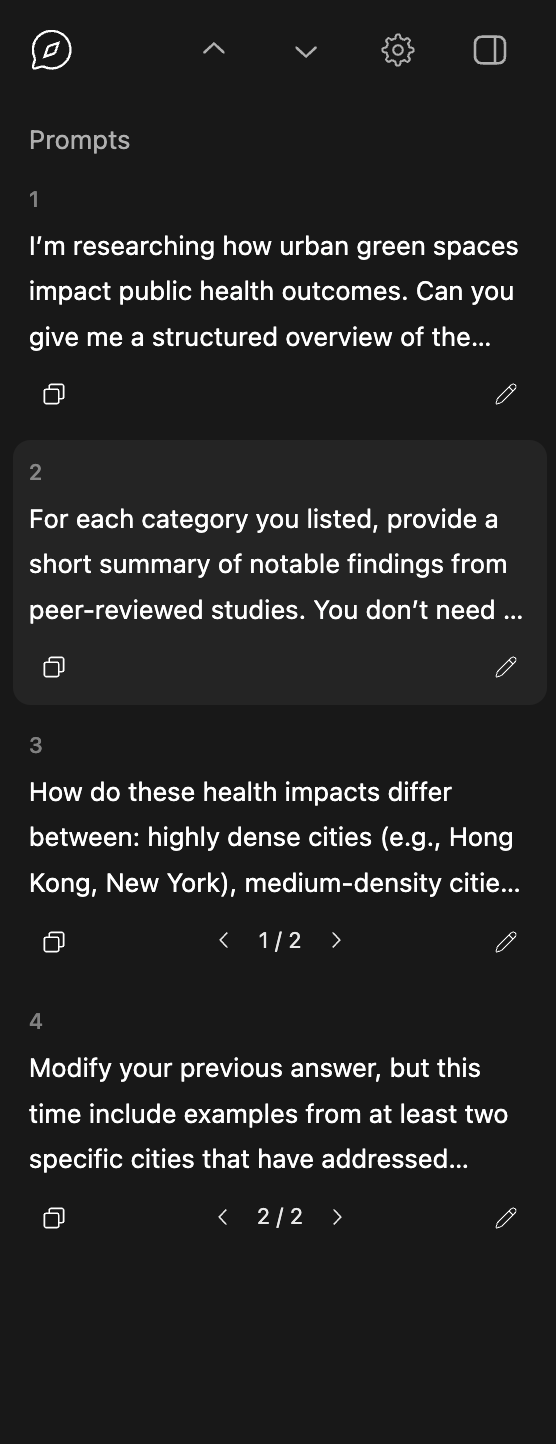
Everything you need. Right where you need it.

Prompt History
View every prompt in the chat. Useful for understanding context and planning.

One-Click Navigation
Jump instantly to any prompt. Navigate long threads in seconds.

Instant Copy
Copy prompts with one click for reuse, sharing, or refinement.

Instant Edits
Edit from the sidebar. No more hunting for the edit button.

Prompt Version History
Switch between edited versions and understand how your context evolves.
It's all about context
In ChatGPT, every reply depends on what came before. Small changes to a prompt can completely change the outcome.
How ChatGPT works
ChatGPT generates responses based on the entire chat history. Earlier prompts and replies shape everything that follows.
Why edits matter
Editing a prompt creates a branch in the chat. You can now generate different responses using the same information from earlier.
How NavGPT helps
Easily locate and jump back to the prompt that set the direction, refine it, and move forward keeping track of how the context evolves.
Simple pricing
Install NavGPT for free.
Get 14 days of Pro - no credit card required.
After that, stay on Free or upgrade for unlimited history.
Free
$0 forever
Free install from the Chrome Web Store
- View your last 5 prompts
- Jump to, edit, and copy prompts instantly
- 14-day pro trial included
Pro
$24 / year
Unlimited history + early access to new features
- View entire conversation history
- Everything in Free
- Prompt version history and navigation
- Early access to new features
No credit card required. No surprise charges.
Privacy First

NavGPT runs only on chatgpt.com.
Your conversations never leave your browser.
- No analytics
- No tracking
- No ads
- No data selling

Better answers. Less friction.
If you’re tired of getting lost in long chat threads, NavGPT helps you stay in control of your context.
Add to Chrome